.jpg)
Turns your Android phone into a free WiFi Hotspot - no rooting or tether plan required.

Size: 0.2 MB
Android Requires : 2.2+
https://play.google.com/store/apps/details?id=com.foxfi
Tutorials: HOW TO Install APK Files on Android Device?
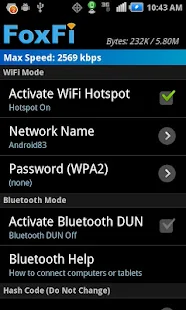
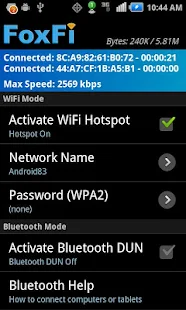
You can connect from any computers or tablets or even game console. Access Point is infrastructure mode with WPA2 security. FoxFi usage is covered under the same phone data plan you have and no tether plan needed. This saves you $20/month from your carrier.
The free version now has a usage limit that requires you to restart FoxFi to continue using free mode. You can purchase the full version key to unlock this.
Currently WiFi mode does not work on most phones with Jelly Bean (except for a few models) and most HTC phones (except for HTC One). However Bluetooth mode works for all phones. To check and see if WiFi mode can be supported on your phone visit http://foxfi.com/devices
*Sprint and AT&T has removed FoxFi from Market. If you can not find FoxFi please install or upgrade from http://foxfi.com/bin, or scan the QR code in the third screenshot.
Here are some tips to help your usage:
1. On some models if you run into WiFi problem after using the Hotspot, simply reboot your phone and rename the hotspot before activating to clear the issue.
2. For some Samsung phones if your computer is not able to get an IP address, try to turn on WiFi on the phone first and make sure it does not connect to any WiFi network, then turn on FoxFi.
3. FoxFi is tested on non-rooted phones. If your phone has a rooted ROM it may or may not work.
4. When WiFi hotspot is activated you may also see a hotspot notification of the built-in WiFi hotspot feature. Please ignore it. As long as you do not sign up for a tether plan you won't be charged.
5. If you enter or change the hotspot password, make sure you rename the hotspot also before activating.
6. Sometimes Windows need a "repair" on the WiFi menu to get a correct IP address.
7. If you install the FoxFi AddOn app, you will also be able to hide tether usage by setting a proxy server address in the computer browser.
What's New
WiFi mode currently will not work if you have updated your phone to Android 4.4 (KitKat). Please use USB/Bluetooth mode instead.
Galaxy S3, S4 and Note 2, 3: WiFi mode issue has been fixed and will also work with the 4.3 update (not 4.4!) from Verizon (not AT&T). There is also a way to remove the lock screen if you don't like it, please see descriptions!
The free version now has a usage limit that requires you to restart FoxFi to continue using free mode. You can purchase the full version key to unlock this.
Currently WiFi mode does not work on most phones with Jelly Bean (except for a few models) and most HTC phones (except for HTC One). However Bluetooth mode works for all phones. To check and see if WiFi mode can be supported on your phone visit http://foxfi.com/devices
*Sprint and AT&T has removed FoxFi from Market. If you can not find FoxFi please install or upgrade from http://foxfi.com/bin, or scan the QR code in the third screenshot.
Here are some tips to help your usage:
1. On some models if you run into WiFi problem after using the Hotspot, simply reboot your phone and rename the hotspot before activating to clear the issue.
2. For some Samsung phones if your computer is not able to get an IP address, try to turn on WiFi on the phone first and make sure it does not connect to any WiFi network, then turn on FoxFi.
3. FoxFi is tested on non-rooted phones. If your phone has a rooted ROM it may or may not work.
4. When WiFi hotspot is activated you may also see a hotspot notification of the built-in WiFi hotspot feature. Please ignore it. As long as you do not sign up for a tether plan you won't be charged.
5. If you enter or change the hotspot password, make sure you rename the hotspot also before activating.
6. Sometimes Windows need a "repair" on the WiFi menu to get a correct IP address.
7. If you install the FoxFi AddOn app, you will also be able to hide tether usage by setting a proxy server address in the computer browser.
What's New
WiFi mode currently will not work if you have updated your phone to Android 4.4 (KitKat). Please use USB/Bluetooth mode instead.
Galaxy S3, S4 and Note 2, 3: WiFi mode issue has been fixed and will also work with the 4.3 update (not 4.4!) from Verizon (not AT&T). There is also a way to remove the lock screen if you don't like it, please see descriptions!


.jpg)